Deals Listing Overview
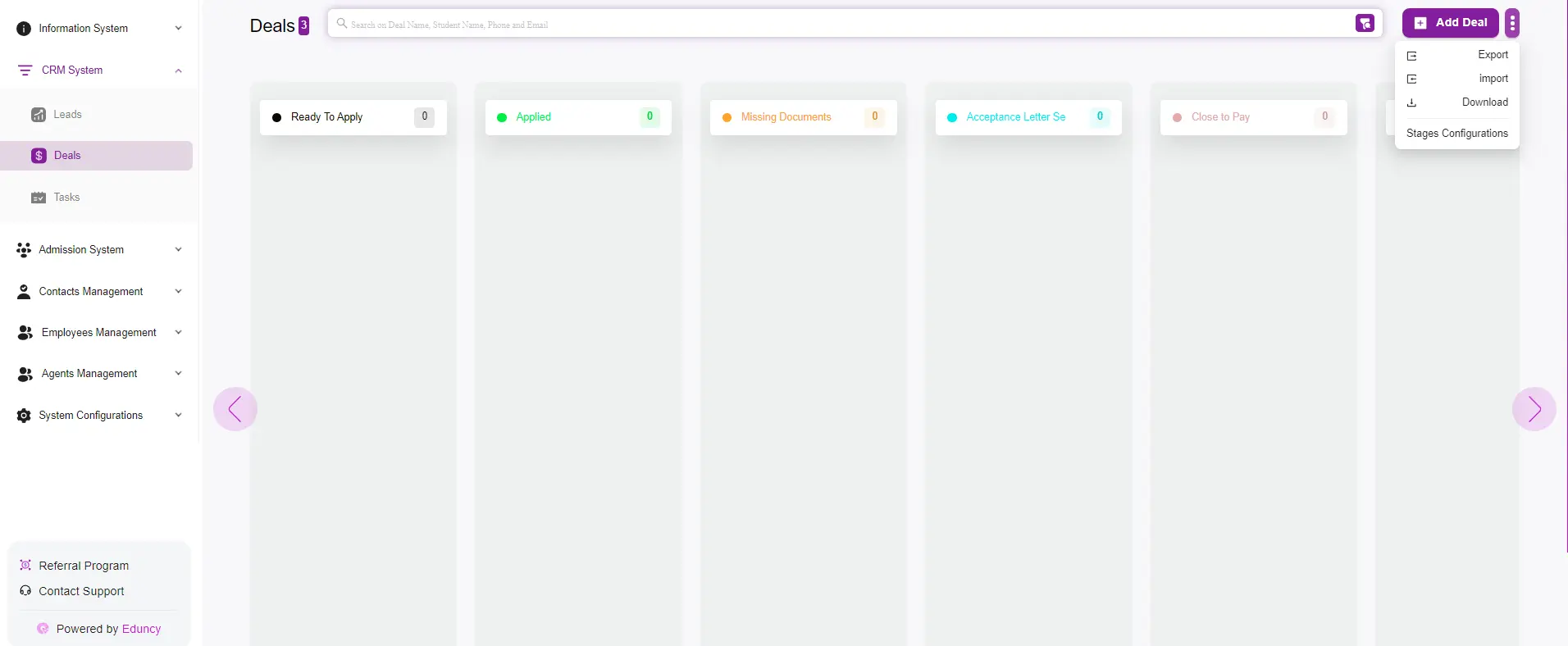
The Deals page in the system is designed to help you efficiently manage and track your customers throughout the sales pipeline.
Here’s a detailed overview of the functionalities and features available on this page:
Main Features
Deal Stages Kanban Board
- The Deals page is organized as a Kanban board, where deals are categorized into different stages:
- Ready to apply
- Applied
- Missing Documents
- Paid
- This visual representation allows you to track the progress of each deal through the sales pipeline at a glance.
Quick Actions
On the top right corner, there are several quick action buttons:
- Add Deal: Click this button to manually add a new deal to the system. For more info click Here.
- Export: Export the list of deals for reporting or backup purposes.
- Import: Import deals from an external source to quickly populate your pipeline.
- Download: Download the details of your deals in a specific format.
- Stages Configurations: Customize the stages of your sales pipeline to fit your business process.
Deal Information Card
Each deal is represented by a card containing key information:
- Name and Timestamp: Displays the name of the deal and the time it was created.
- Contact Methods: Icons indicating available contact methods (phone, email, WhatsApp).
- Source: Shows how the deal was generated, for example, manually by an admin.
- Deal Owner: Indicates who is responsible for the deal within the system.
Search and Filter
- The search bar at the top allows you to quickly find specific deals by entering keywords such as:
- Deal name
- Student name
- Phone number
- Email address
- The filter options enable you to sort and view deals based on different criteria, helping you focus on specific segments of your deal list.